// hosting explained
HSTS and HSTS preload explained, without breaking your subdomains
HSTS tells browsers to only ever load your site over HTTPS. It's a good security header, and also one of the few settings that can lock visitors out of part of your site for months if you rush it.
KEY TAKEAWAYS
- HSTS is a response header:
Strict-Transport-Security: max-age=31536000. - includeSubDomains applies it to every subdomain; any subdomain without HTTPS breaks.
- Preload puts your domain on a list built into browsers; getting off it is slow.
- Enable HSTS on the main domain first, then subdomains, then preload last.
What the three parts do
- max-age: how long (in seconds) browsers remember to use HTTPS only. One year is 31536000.
- includeSubDomains: applies the rule to
blog.,shop.and every other subdomain. - preload: asks to be added to the browser preload list, so even a first visit uses HTTPS. Joining requires a separate request at hstspreload.org, a max-age of at least one year, includeSubDomains, and HTTPS redirects.
A safe rollout
- Make sure every subdomain works over HTTPS, including old ones like mail or staging.
- Turn on HSTS for the main domain with a short max-age, then raise it.
- Add includeSubDomains.
- Only then consider preload.
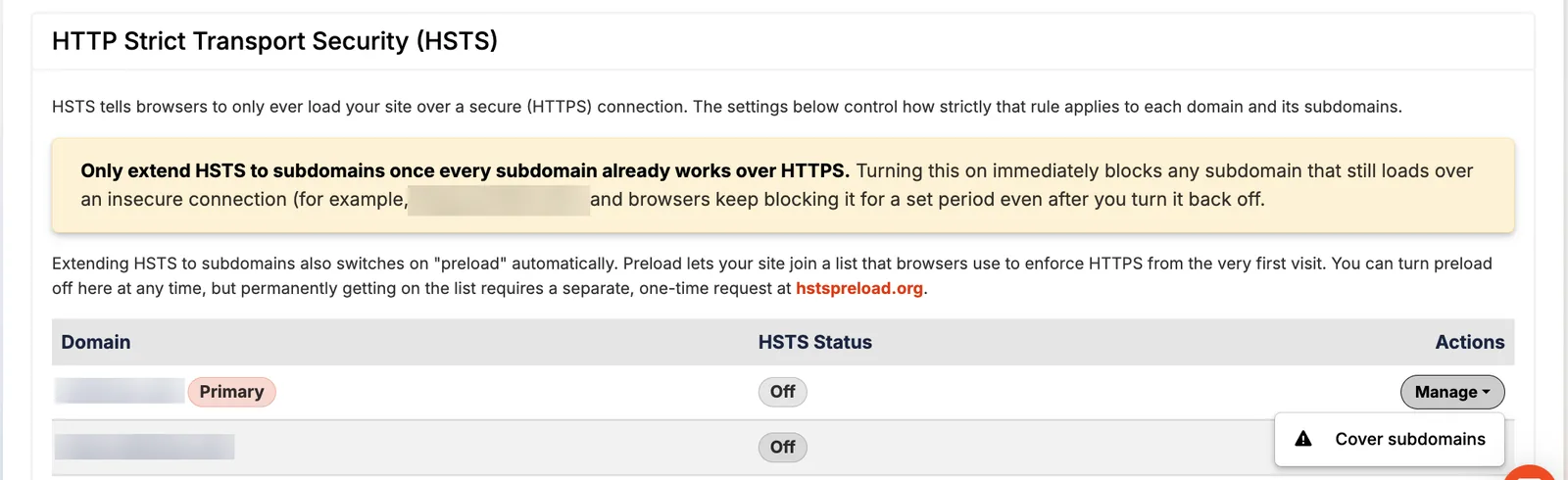
Pressable shows HSTS per domain with a clear warning before "Cover subdomains", which also switches on the preload directive.
SOURCES
Prices and limits change. We note the date we checked each one; confirm on the provider's site before you buy.
Keep reading
Hosting explainedEgress firewalls & environment variablesThree server-level protections most WordPress sites lack: an egress firewall, secrets in environment variables…Pressable how-to guidesPressable Edge Rules: block countries, bots & AI crawlersHow to use Pressable Edge Rules to block or challenge countries, allow only your IP into wp-admin, keep AI cra…reviewPressable review: 9 years as a customer