DNS propagation checker
Changed your DNS or moved hosts? Compare 7 of the biggest public DNS resolvers side by side and see which ones still have the old answer cached.
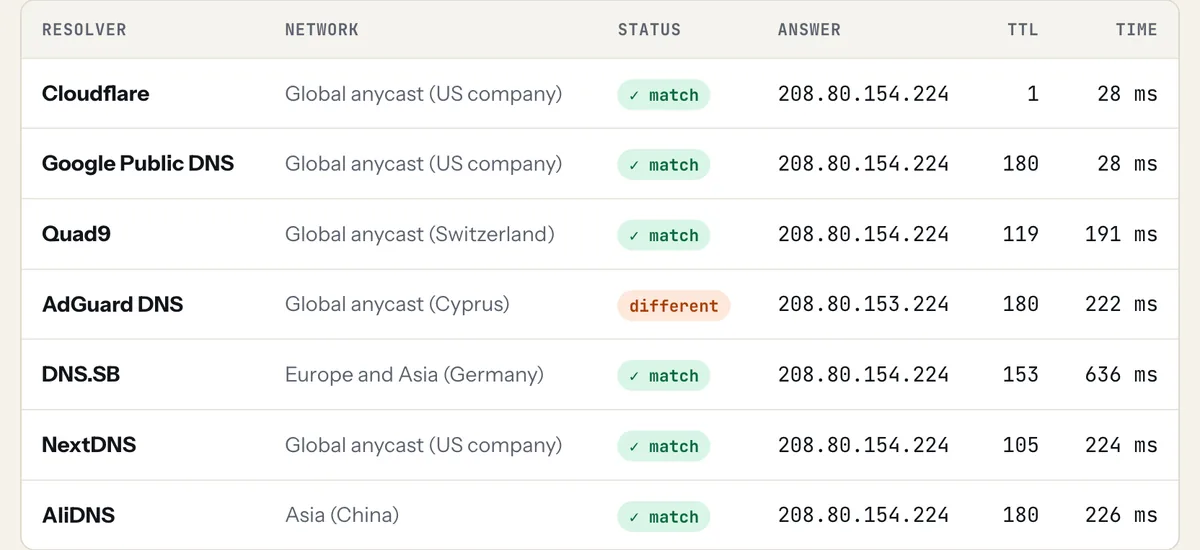
A real check of wikipedia.org: all 7 resolvers answered. AdGuard got a different Wikipedia data center, which the tool now labels "same network" rather than an old cache.
What "DNS propagation" really is
Nothing is pushed around the world when you change a record. Your DNS provider updates it instantly; what takes time is caches. Every resolver that looked up your domain recently keeps the old answer until its TTL (time to live) runs out, then asks again and gets the new one. So "propagation" is really old caches expiring.
Which resolvers we check
| Resolver | Network |
|---|---|
| Cloudflare | Global anycast (US company) |
| Google Public DNS | Global anycast (US company) |
| Quad9 | Global anycast (Switzerland) |
| AdGuard DNS | Global anycast (Cyprus) |
| DNS.SB | Europe and Asia (Germany) |
| NextDNS | Global anycast (US company) |
| AliDNS | Asia (China) |
These are independent organisations with their own caches, and together they answer a large share of the world's DNS queries. Many "global propagation" tools query a few servers per country; we prefer fewer, larger resolvers that real visitors actually use. Your internet provider's resolver isn't in the list and may lag behind.
How to make a DNS change spread faster
- A day before the change, lower the record's TTL to 300 seconds (5 minutes).
- Wait for the old TTL to expire, then make the change.
- Check here: most resolvers update within minutes.
- Once everything matches, raise the TTL back to 3600 or more.
Changing name servers is slower: the TTL on NS records at the registry is often 24-48 hours, and you can't lower it. Plan name server moves for a quiet time.
FAQ
How long does DNS propagation take?
Usually minutes to a few hours for A, CNAME, MX and TXT changes, depending on the old record's TTL. Name server changes can take up to 24-48 hours because the TLD registry's TTL is longer.
Why does my site show the old version after I moved hosts?
Your computer, browser or internet provider still has the old IP cached. Check here: if all resolvers show the new IP, flush your local DNS cache or try from a phone on mobile data.
Can I force DNS to propagate?
No one can clear other resolvers' caches. You can only plan ahead by lowering the TTL before a change. Some resolvers (Cloudflare and Google) have public "purge cache" pages for single domains.
What does "different" mean in the results?
That resolver is still returning a cached answer that differs from what most others return. It will update once its TTL expires. If the answer is a different server on the same network, we mark it "same network" instead: big sites like Wikipedia or Google send each region to its nearest data center, so different answers there are normal.
CHANGING HOSTS?
DNS is where most migrations go wrong. Follow the hosting switch checklist, lower your TTL a day before, and use the propagation checker after the switch. Comparing new hosts? See real renewal prices.